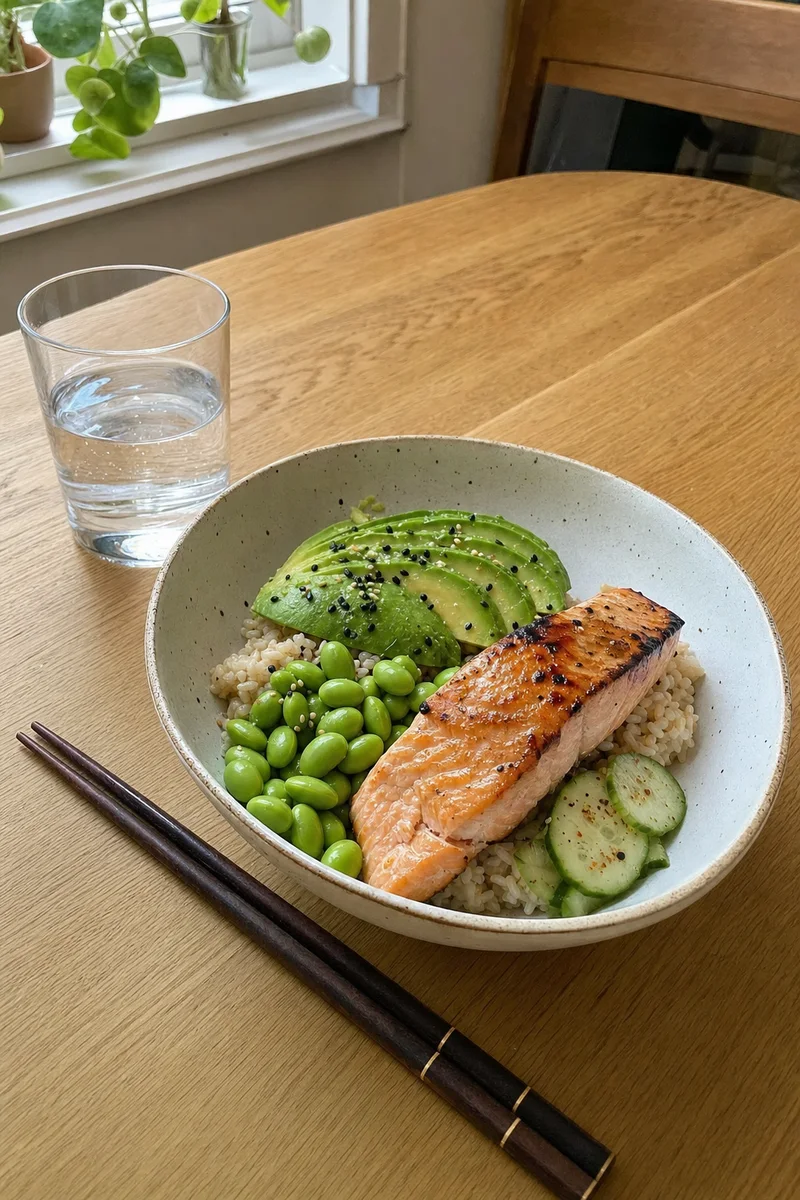
Uploading photo...Identifying...Calibrating weights and portions...
Grilled salmonComputing...250 kcal
Brown riceComputing...165 kcal
EdamameComputing...97 kcal
AvocadoComputing...96 kcal
CucumberComputing...8 kcal
9:41
Confirm meal
0 kcal
5 dishes
AI Estimated
Food macros
40%25%35%
Carbs 62g · 40%Protein 38g · 25%Fat 24g · 35%
Log to which meal
BreakfastLunchDinnerSnack
Dishes
Grilled salmon120 g120 g250 kcal
Brown rice150 g150 g165 kcal
Edamame80 g80 g97 kcal
Avocado60 g60 g96 kcal
Do not recordConfirm log
9:41
Home1,505 kcal left
.51×2
SEARCHSCANDESCRIBEPHOTORECENT
Logged!
1Open KaloCam2Snap your meal3Confirm & done
Illustrative animation with example data. Interface may vary by version.
ASK THE TEAM
You ask. We answer. Honestly.
Questions about KaloCam, answered by the people who build it, including what's ready, what's still in testing and what we're not doing yet.
Swipe to explore questions →
Asked often
Can KaloCam open straight to the camera? Most of the time I just want to snap my plate.
The KaloCam teamIn testing
Yes, that's exactly where we're heading. In the version we're testing now, KaloCam opens on the camera: tap the shutter and you're done. Your calories left for today sit at the top, and Home is one tap away when you want the full picture.
Sometimes I can't take a photo, like at a work lunch. Can I log a meal another way?
The KaloCam teamIn testing
Voice logging is available for Pro members today. We're also testing a Describe mode right in the camera: type something like "2 eggs, toast and a black coffee", or tap the mic and say it.
Three simple steps. You’re in control of the details.
01
Take a photo
Capture your meal in KaloCam. Start with what’s on your plate.
02
Make it yours
Review estimated calories and macros. Adjust the foods and portions.
03
Save your meal
Add it to your diary and see how your day comes together.
MEET YOUR EVERYDAY FOOD COMPANION
One app. A clearer picture.
Take a look at what happens after the photo.
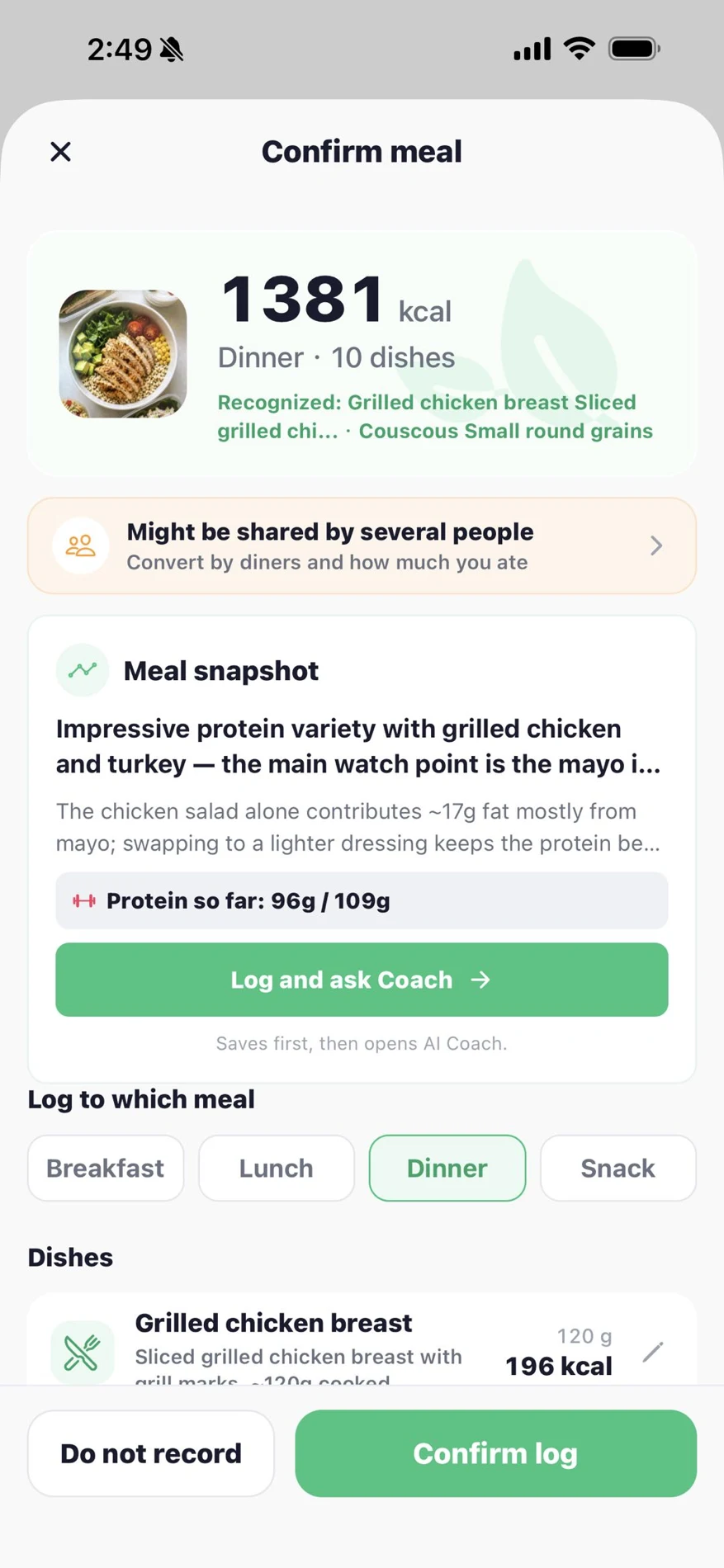
See estimated calories and macros, check what’s been recognized, and adjust the portions before you log.
Meal review · Actual app screenshot
Your photo is a starting point. You know the rest of the story.
A HELPFUL ESTIMATE. YOUR FINAL SAY.
Real meals. Room for the details.
A photo can’t show every ingredient, cooking oil or serving size. KaloCam gives you an estimate to review, not a perfect measurement.
01
Check what’s in your meal
Review recognized foods and adjust ingredients and portions before saving.
02
Look beyond a calorie number
See protein, carbohydrates and fat alongside estimated calories.
03
Build a record that’s yours
Keep the meals you log together, then use your diary to understand your routine.
BUILT FOR EVERYDAY FOOD TRACKING
Clear about what you’re getting.
Available on the App StoreFor iPhone running iOS 17 or later.
Your subscription, explainedPlans and prices appear in the app before purchase.
Support from the teamMade by FUNCONNECT PTE. LTD. Contact us
A FEW THINGS YOU MIGHT BE WONDERING
Good questions. Clear answers.
What does KaloCam do?+
KaloCam is an AI calorie and macro tracker for iPhone. Take a food photo, review the nutrition estimates, adjust ingredients and portions, and save the meal to your food diary. Its AI Coach offers general nutrition guidance based on your logged meals.
How accurate are photo estimates?+
A photo cannot reveal every ingredient, cooking oil or exact portion. Estimates can vary with preparation and serving size. Review the result and edit it before saving. KaloCam is for general wellness, not medical advice.
Does KaloCam track macros as well as calories?+
Yes. KaloCam estimates protein, carbohydrates and fat alongside calories. Review the recognized foods and portions, then save the meal to your food diary to see your daily totals.
Is KaloCam free?+
KaloCam is available to download on the App Store and offers in-app subscriptions for Pro features. Available plans, prices and any trial terms are shown in the app before purchase. Subscriptions renew automatically unless canceled.
Can I change my portions or ingredients?+
Yes. You can review and edit recognized dishes, portions and meal categories before logging your meal.
Is KaloCam available on Android?+
This website links to the iPhone version of KaloCam on the App Store. It requires iOS 17 or later. We do not currently offer an Android download here.
Where can I download it?+
Download KaloCam from the App Store for iPhone. See the store listing for current compatibility and availability.
A LITTLE HELP WITH WHAT TO EAT
A week of meals. Already thought through.
Explore our free 7-day keto meal plan, with recipe portions, estimated nutrition and a shopping list that scales.
 The KaloCam teamIn testing